Posts

UFT-14-features

Image
HP has released UFT 14 on Feb 1st and the 60-day trial version is now available for public download. This update is equipped with lots of new features and enhancements: Test Data Generator. Sniper aka Capture mode. New UFT Editions. LeanFT for Selenium. Here are the 9 most important things to note about the latest version. 1. Upgrade to UFT 14 If you are on  UFT 11.5  or above version, you can directly run the  SetUp  to upgrade to UFT 14. If you are on UFT/QTP version earlier than 11.5, you need to uninstall the current version of QTP and then install UFT 14. If you are upgrading from a version of UFT earlier than 12.5, you should get a new license. Since UFT 12.5, HPE has moved from  Sentinel to AutoPass licensing mechanism . 2. More UFT Editions UFT is now offered in 3 new flavors. UFT Ultimate, UFT Enterprise, and UFT Pro. If you previously had a UFT License, it will now be renamed to UFT Enterprise. If you previously had a Lean...
Create a Main Folder,SubFolder in UFT and ZipAttachment to QC test

Function CreateMainFolder() On Error Resume Next 'Dim strDrive, strfoldername,objFSO, objFolder strDrive = "K:\QA\" strfoldername="Automation_Results" strPath= strDrive&strfoldername Set FSO = CreateObject("Scripting.FileSystemObject") Check = FSO.FolderExists(strPath) Set FSO = Nothing If Not Check Then Set objFSO = CreateObject("Scripting.FileSystemObject") Set objFolder = objFSO.CreateFolder(strPath) End If End Function Function CreateSubFolder(strPath) On Error Resume Next 'Dim  strSubFile,objFSO, objFolder ''strSubFile = "Production_Result_"& Day(now) & "_" & month(now) & "_" & year(now) & "_"& hour(now) & "_" & minute(now) ''strNewpath=strPath& "\"&strSubFile Set FSO = CreateObject("Scripting.FileSystemObject") Check = FSO.FolderExists(strNewpath) Set FSO = Nothi...

Customized HTML reports in UFT

Public strHTMLFileName,strFileURL,htmlresult,fso @@@@@@@@@@@@@@@@@ Function OpenFile() On error resume next strHTMLFileName= gbReportFilePath & "\TestResult_" & Day(now) & "_" & month(now) & "_" & year(now) & "_" & hour(now) & "_" & minute(now) &".html" StartTime = Timer stTime = Time Set fso = CreateObject("Scripting.FileSystemObject") Set htmlresult = fso.CreateTextFile(strHTMLFileName, ForWriting, True) 'OpenTextFile(strHTMLFileName, ForWriting, True) strFileURL = strHTMLFileName  CreateHeader End Function @@@@@@@@@@@@ 'Create header in reporter file Function CreateHeader() On error resume next htmlresult.writeline("<html>") htmlresult.writeline("<title>"&Environment("TestName")&"</title>") htmlresult.WriteLine("<head></head>") htmlresult.WriteLine(...

UFT Run time added Data table

Function Importsheets() uploadfile = "check.xls" 'fname = "K:\QA\check.xls" Datasheet = "Search" 'ADDING THE SHEETS TO DATATABLE (YOU CAN GIVE YOUR OWN NAME TO SHEETS) DataTable.AddSheet sheet1 Datatable.DeleteSheet "Action1" DataTable.DeleteSheet "Global" wait 5 'IMPORTING THE SHEETS TO DATATABLE DataTable.ImportSheet fname,sheet1,Datasheet End Function

UFT Delete cookies for IE

'Create the WebUtil object to delete cookies Dim WshShell,objShell Function Deletecookies() Set WshShell = CreateObject("WScript.Shell") WshShell.run "RunDll32.exe InetCpl.cpl,ClearMyTracksByProcess 8" 'To clear browsing cookies WshShell.run "RunDll32.exe InetCpl.cpl,ClearMyTracksByProcess 2" 'To Clear Browsing History WshShell.run "RunDll32.exe InetCpl.cpl,ClearMyTracksByProcess 1" Wait 10 End Function

UFT 12.53 – New Features

Image
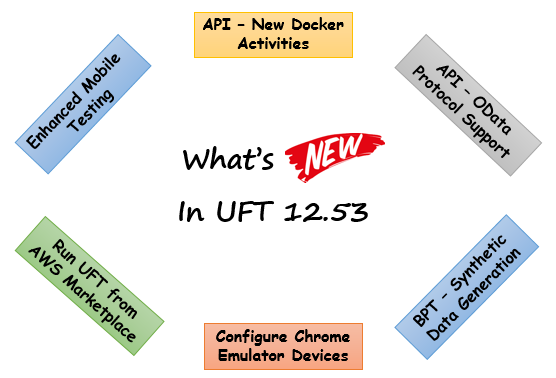
I will list down the new features that have been added to UFT 12.53. If you are using some older version of UFT or QTP in your projects, then it would be good to have a look through this article so that you get to know the new features that are available with UFT 12.53. There is a good chance that you might find some features which are useful in your project, thereby helping you decide if you want to switch to the newer version of the tool. Let’s now have a look at the new features in UFT 12.53 – Enhanced Mobile testing This version of UFT supports enhanced functionality for both native and hybrid mobile apps. Now, you can: a) Configure devices and applications for your tests directly from the new Mobile Center wizard b) Test non-packaged apps. This means you no longer need to package apps to upload them to Mobile Center c) Test mobile web apps using the device’s native browser – Safari for iOS devices, and Chrome for Android devices New Docker activities for API t...

Synchronization in UFT

Image
When we automate the script most of the time we faced several issues with performance of application. sometimes application becomes slow in response sometimes fast. then how we show make sure that our script should run in irrespective of the application performance and response? all automation tools provide specific functions which handles these performance issue. UFT also has Synchronization mechanism to make sure that script will not fail. Lets discuss more about the Synchronization. There are 5 different ways to handle the synchronization. WaitProperty Exist Wait Sync(only for web based apps) Default Synchronization WaitProperty: WaitProperty is a method  which can be apply on any object in UFT. It takes the property name, Value and Timeout value as input to perform the sync. It is a dynamic wait, it means once the object is get visible/enable or state becomes true corresponding action gets performed. so it is highly recommended options. Example...

Release Locked UFT Tests from QC

Release locked UFT Test from QC-> USERID -Enter you user name Set QCConnection=QCUtil.QCConnection Set con=QCConnection.command   con.CommandText=”DELETE FROM LOCKS WHERE LK_USER = ‘USERID’   Set recset=con.execute

Ten Key Principles of Effective Testing

1. Testing is a risk management process. 2. Understand the application being tested. 3. Set clear testing objectives and criteria for successful completion (including test coverage measures) 4. Create an effective test environment. 5. Test as early as possible in the development cycle (Shift Left Testing) 6. Do plan for User Acceptance Testing (UAT). 7. Regression testing. 8. Automate as much as possible. 9. Capture test incidents and use them to manage risk at release time. 10. Manage change properly to avoid undoing all the testing effort.

VBScript Built-in Functions

1. Date and Time Functions ·            CDate:   Converts a valid date and time expression to the variant of subtype Date. ·            Date :   Returns the current system date. ·            DateAdd:   Returns a date to which a specified time interval has been added. ·            DateDiff:   Returns the number of intervals between two dates. ·            DatePart:   Returns the specified part of a given date. ·            DateSerial:   Returns the date for a specified year, month, and day. ·            DateValue:   Returns a date. ·            Day:   Returns a number that represe...